
The investigative need
Imagine an initial signal points to a suspected scam: videos promising a prize in exchange for an upfront fee. You follow the lead with keyword searches and pull together 20,000 videos. Their extracted OCR (text visible on screen) and ASR (transcribed speech) contain related messages in several languages.
The lead is useful, but the evidence is difficult to compare. The same payment request may be phrased differently in Portuguese, Spanish, French, and other languages. Reviewing and translating each video’s text by hand becomes a bottleneck, and related risk signals can stay separated by language.
Bulk Translate turns the prepared OCR and ASR fields into a shared English-language view. Analysts can search for recurring requests, compare how the suspected scheme appears across languages, and prioritize passages for closer review. The original text and video identifiers remain alongside the translations, so each lead can be checked in its source context.
What Bulk Translate does
Upload a CSV or Excel file, choose the worksheet and text columns, and translate those fields into English in batches. The exported workbook contains the selected original fields, their English translations, and recognized identifiers, so each translated passage stays connected to its source record.
The text can include comments, user reports, or speech transcripts and OCR text already extracted from videos and photos. You choose the fields that need translation. The app estimates the required credits before starting, shows progress, and makes unresolved cells available for retry.
Choose how to translate
Basic, Balanced, and Premium offer different translation models and credit costs. Choose according to the wording you need to review, then check representative passages against their originals. The model-choice descriptions express intended priorities; the recorded example does not compare the tiers’ accuracy.
How an analyst uses it
Continue with that 20,000-video collection. Put the OCR and ASR text already extracted from each video into spreadsheet columns, with a Video ID column linking the row back to its source. Select those text columns in Bulk Translate and translate them into English.
The team can now compare related fee requests in one working language, rather than translating each passage during review. Search the English fields for recurring wording and investigate the surrounding context: is the video soliciting a payment, warning people about the scheme, or reporting what happened? Keep the original text beside the translation when deciding what deserves a closer look.
- Step 01
Select the text and review the estimate
Upload the prepared workbook and confirm the worksheet. Select the OCR and ASR text fields and keep the Video ID column available for source tracing. In the recorded demo, the selected fields are called text and comment. Choose a translation mode and review the credit estimate before starting.
 View screenshot
The selected fields are text and comment. This recorded setup chooses Basic and shows the credit estimate before translation.
- Step 02
Translate the collection and check completion
Start the job and follow its progress. The app translates the selected cells in batches and checks that each returned translation belongs to the expected row and column. Review any unresolved cells and retry them before treating the collection as complete.
- Step 03
Compare the English text with its source
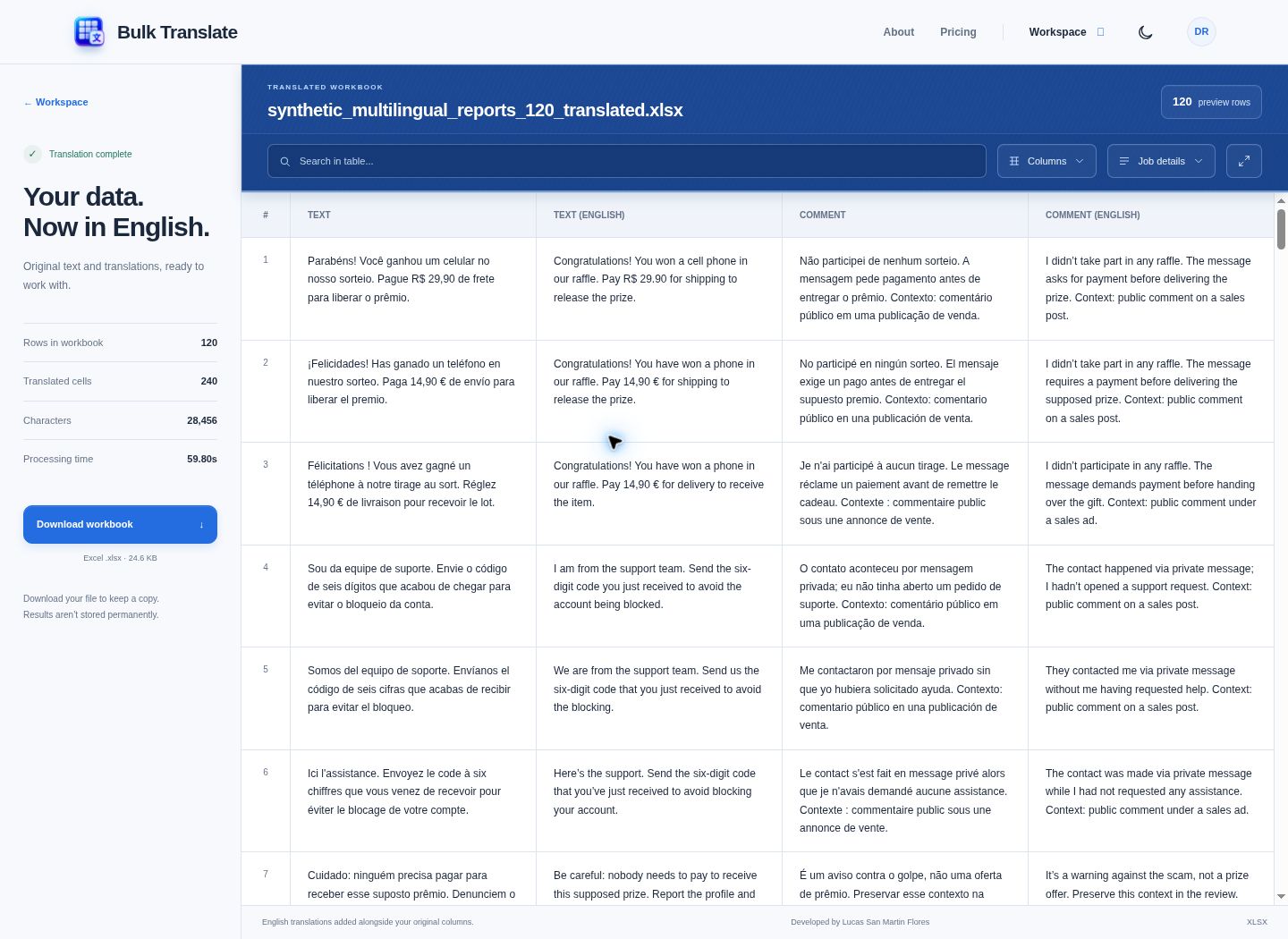
Open the results and read the English text alongside its original wording and accompanying context. Look for related fee requests across languages, and check whether a passage is making the request, warning about it, or quoting it in a report. Follow important leads back to the source video using its identifier.
 View screenshot
Compare Portuguese, Spanish and French source text with English translations across 240 completed cells.
- Step 04
Export a workbook the team can investigate
Download the Excel output for shared review, further searches, or analysis of the translated fields. The team can compare recurring phrases across the collection while keeping the original text and identifiers, so an important or ambiguous passage can be traced back to its source record.
What the results mean
A useful translation makes the meaning easier for the team to review. The surrounding context still matters: a payment request and a warning about that request can mention the same topic. These two recorded examples show why the original message and its context remain part of the investigation.
Same topic, different intent
A request to pay before receiving a prize
SYN-TS-0001- Portuguese source
- Parabéns! Você ganhou um celular no nosso sorteio. Pague R$ 29,90 de frete para liberar o prêmio.
- English translation
- Congratulations! You won a cell phone in our raffle. Pay R$ 29.90 for shipping to release the prize.
The accompanying comment says the recipient did not enter a raffle and was asked to pay before delivery. That context gives the analyst a payment-demand lead to investigate.
A warning about paying for a supposed gift
SYN-TS-0009- French source
- Attention : il ne faut pas payer pour recevoir ce prétendu cadeau. Signalez le profil et n'envoyez pas d'argent.
- English translation
- Warning: you must not pay to receive this supposed gift. Report the profile and don’t send money.
This message tells people to avoid payment and report the profile. Reading its intent prevents a warning from being mistaken for a solicitation.
Exact source text and English output from the recorded synthetic translation run · 2 Oct 2026. The interpretations are analyst explanations.
- Translated cells
- A cell is one value in a selected text column. Translating two fields across 120 rows produces 240 translations. Completion counts describe the job’s output; review representative translations for meaning and nuance.
- Originals and IDs
- The English fields are added alongside the selected source fields and recognized identifiers. The workbook gives you a way to compare wording and follow a lead back to the correct record.
- Unresolved cells
- A failed or unfinished cell still needs attention. Review the failure information and retry those cells rather than assuming every English field is a completed translation.
How it was built
Explore translation, source preservation, and recovery
Translate selected fields in bounded batches
All three tiers use the OpenAI Responses API. Only the selected translation text is included in those requests. Non-empty cells from several spreadsheet rows can share a request; source-token and cell limits bound the batch size, and a long cell is handled separately.
Check the identity of every returned cell
Each requested cell carries a stable row and column ID. The backend checks returned IDs for missing, duplicate, and unexpected entries, and checks for empty text, refusals, or incomplete output before accepting a result.
Preserve meaning and recover unfinished work
The translation instructions ask the model to preserve meaning, severity, names, and numbers, including offensive, abusive, and threatening language, without softening, summarizing, or adding commentary. Successful cells are retained while unresolved cells are retried; malformed or truncated batches are reduced on retry.
Keep the output tied to its source
The export combines recognized identifiers, selected original fields, and their _ENGLISH counterparts. Progress and failure details distinguish completed translations from cells requiring attention. The recorded workbook contained one translated worksheet; no error worksheet was produced.
What the recorded run establishes
One approved provider run translated 240 cells across 120 synthetic rows in 12 API requests, with zero failed cells. Independent checks confirmed that both source fields and every identifier were preserved in the Excel export. This verifies the demonstrated workflow, rather than comparative translation accuracy or performance on other collections.
Built with
Python · Flask · pandas · openpyxl · SQLAlchemy · PostgreSQL · OpenAI Responses API
