
The investigative need
A search can bring back thousands of relevant comments without showing you the other language people use around the same behavior. Payment requests, repeated claims, and instructions may be scattered across the collection. Reading every row makes it hard to spot the wording that connects them.
I built N-Grams to turn that collection into a shortlist of recurring language. An analyst can find promising phrases, check what they mean in their original context, and use the reviewed wording to expand an investigation.
What N-Grams does
N-Grams analyzes text from a CSV or Excel workbook and ranks recurring words and phrases. An n-gram is a sequence of consecutive words: “pay the release fee” is a four-word n-gram. Counting it across a collection helps reveal wording that individual records have in common.
The input can include comments, posts, captions, or prepared text extracted from media: speech transcribed from videos with ASR, and text read from photos or video frames with OCR. The analyst chooses the text columns, phrase length, and analysis engine, then reviews the results before carrying useful wording into further searches.
Choose the right engine
The engine determines how N-Grams surfaces investigative leads. Start with Traditional to see repeated wording across a collection. Choose another engine when you want to follow a known phrase, retain longer wording, connect related fields, or explore a specific question.
Each engine below explains both the analysis and when an analyst would use it. The examples follow the payment-request investigation introduced on this page.
Traditional
Start with recurring wording

How it works
Count consecutive one- to nine-word phrases in the selected text columns. The default frequency ranking sorts by matching rows, then total occurrences. Four-word phrases surface the recurring payment and verification instructions in this walkthrough.
String
Focus on an existing lead

How it works
Enter a whole-word or phrase seed, such as “release fee.” The engine first keeps rows matching that seed, ignoring letter case, then runs Traditional analysis on the selected text fields within those rows. This helps explore the surrounding language of a lead you already have.
Dynamic
Explore longer phrases

How it works
Extract phrases from two to eight words and rank them by length, matching rows, and occurrences. Shorter phrases are grouped beneath a longer phrase only when they share the same matching rows. This helps retain useful wording while reducing redundant fragments.
Paired
Connect language across fields

How it works
Compare at least two related text fields, such as a video caption and its prepared transcript. Phrases are paired when they appear in the same record. Shared-row counts show how often the pair occurs together; the Of A and Of B percentages show how much of each phrase’s matching set that overlap represents.
Discovery
Explore an investigative question

How it works
The optional paid OpenAI engine uses an analyst’s prompt to propose exact phrases from selected text. Proposed spans are checked against the source cells before counting. Analysts can open highlighted source comments to assess meaning. Selected text is sent to OpenAI when this engine is chosen; the recorded walkthrough did not use it.
How an analyst uses it
Imagine you are investigating suspicious payment requests and have collected 6,000 comments. Your initial search found relevant content, but you still need to discover the instructions and recurring phrases behind the trend. Reviewing all 6,000 comments one at a time would make that difficult.
Start by finding repeated language across the collection. A phrase such as “pay the release fee” gives you something concrete to investigate: how widely it appears, who is using it, and whether the surrounding text is a solicitation, a warning, or a report. Once you have checked the context, the phrase becomes a new search lead.
- Step 01
Prepare the text and set the scope
Upload the workbook, confirm the sheet and header row, and select the column containing the comments. For this walkthrough, choose the Traditional engine, set the phrase length to four words, and request the top 50 results. Keep the original worksheet available for checking source records.
 View screenshot
Select the text field, phrase length and result limit for the analysis.
- Step 02
Surface candidate phrases
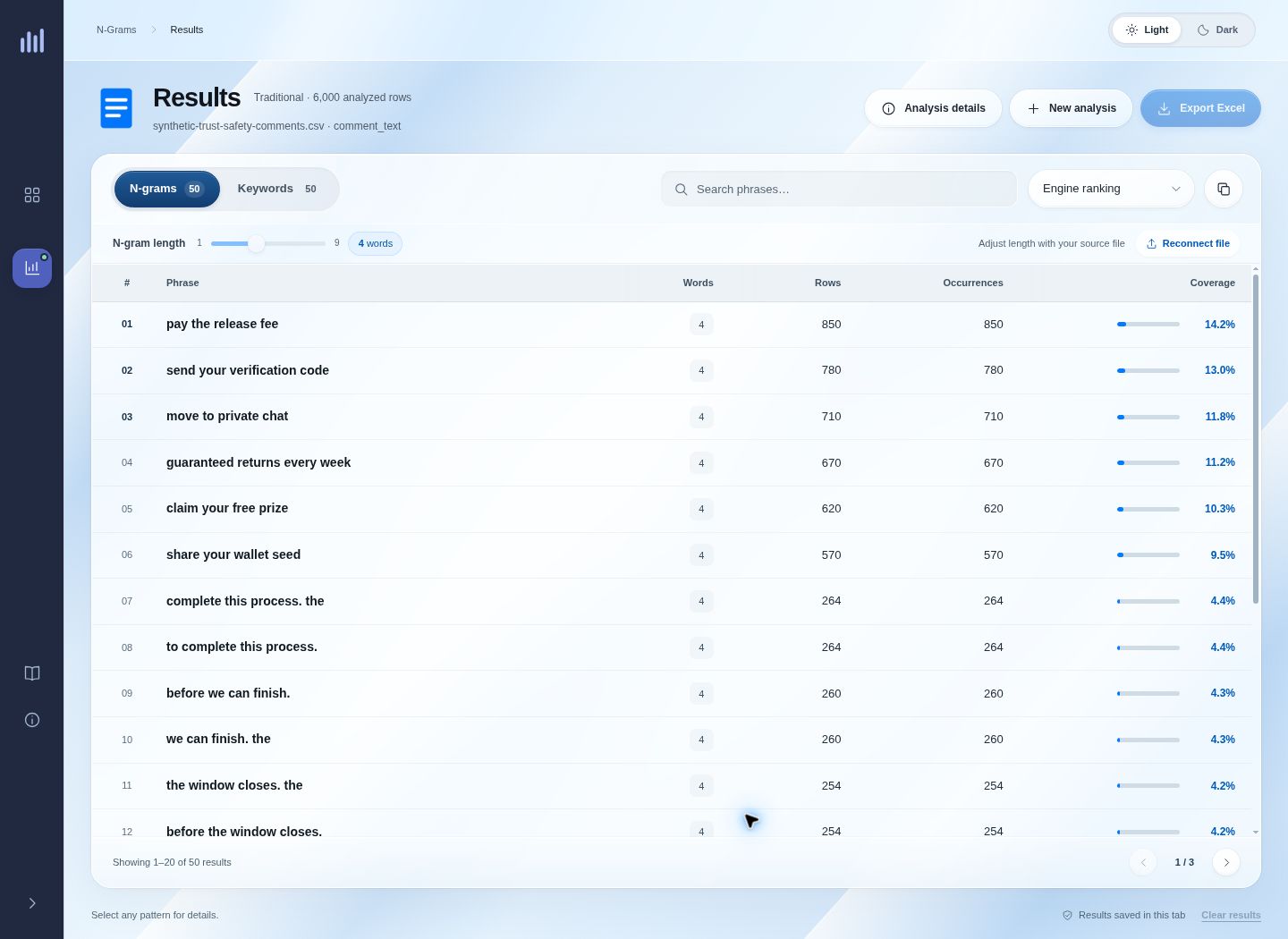
Run the analysis and inspect the ranked phrases. “Pay the release fee” appears in 850 rows; “send your verification code” appears in 780. These repeated instructions give the analyst specific wording to examine. Compare candidates and adjust the phrase length when a result needs more surrounding words to become meaningful.
 View screenshot
Compare recurring four-word phrases: “pay the release fee” appears in 850 rows and “send your verification code” in 780.
- Step 03
Check the metrics and original context
Open a phrase to inspect its matching rows, occurrences, and coverage. Then search for that wording in the original worksheet and read the surrounding comments. The phrase detail screen establishes how often the words appear; the source records establish how they are being used.
 View screenshot
Inspect matching rows, occurrences and coverage for a phrase before returning to the source worksheet.
- Step 04
Turn reviewed wording into new searches
Copy useful phrases or export the results to Excel. Use the reviewed wording in your platform or research searches to look for related content beyond the original collection. Check each new match in context, then bring relevant text back into the next analysis.
What the results mean
The results help prioritize language for investigation. Read the counts alongside the source context, and choose a ranking that fits the question you are trying to answer.
- Matching rows
- How many records contain the phrase. In the recorded run, 850 separate comments contain “pay the release fee.” This is a count of matches, not a count of confirmed violations.
- Coverage
- The share of analyzed rows that contain the phrase. Here, 850 out of 6,000 comments is 14.2%. It describes this collection, rather than the prevalence of the behavior across a platform.
- Occurrences
- How many times the phrase appears in total. A phrase repeated twice in one comment adds two occurrences but only one matching row. In this example, the phrase occurs once in each of its 850 matching rows.
- Frequency / TF-IDF
- Frequency helps find wording repeated across many records. The TF-IDF ranking available in Traditional, String, and Dynamic gives more weight to wording that is distinctive within the collection. Compare the two rankings to find useful leads; neither score establishes whether content violates a policy.
How it was built
The engine guide above explains how to choose an analysis. The details below cover ranking, exports, and what was verified in the recorded local run.
Explore ranking, exports, and engineering details
Keep the ranking comparison consistent
Traditional, String, and Dynamic offer a separate TF-IDF ranking. It combines repetition within a row with rarity across the collection. For filtered analyses, rarity is calculated against the full worksheet, so narrowing a seed does not redefine the background collection. Switching rankings recalculates the top results rather than simply reordering the visible table.
Carry results into the next review
Excel exports include the analysis settings and returned results. The selected ranking and sort order are preserved, and the export includes all returned results even when the visible table is filtered or paginated. The original worksheet remains the reference for reviewing the source text in the Traditional workflow.
What the recorded run establishes
The verified local run covered workbook upload, field inspection, Traditional analysis, phrase details, and Excel export. Independent counts agreed with the app across 150 phrases at three-, four-, and five-word lengths. The deliberately constructed synthetic corpus demonstrates recurrence and context review; it does not estimate real-world prevalence.
Built with
Python · Flask · pandas · NLTK · TF-IDF · OpenAI Responses API · tiktoken · openpyxl · Vanilla JavaScript · CSV / XLSX / XLS
